


Rescript vs VEED
Rescript vs VEED
Both run in a browser tab, and that's where the resemblance ends. VEED uploads your video to its servers and edits it there — a general-purpose online editor with subtitles, templates, and effects, on a subscription whose free tier watermarks exports. Rescript runs in the browser but processes everything on your own machine, and never watermarks anything. VEED does far more kinds of editing; Rescript does transcript-based cutting properly and doesn't charge for it.
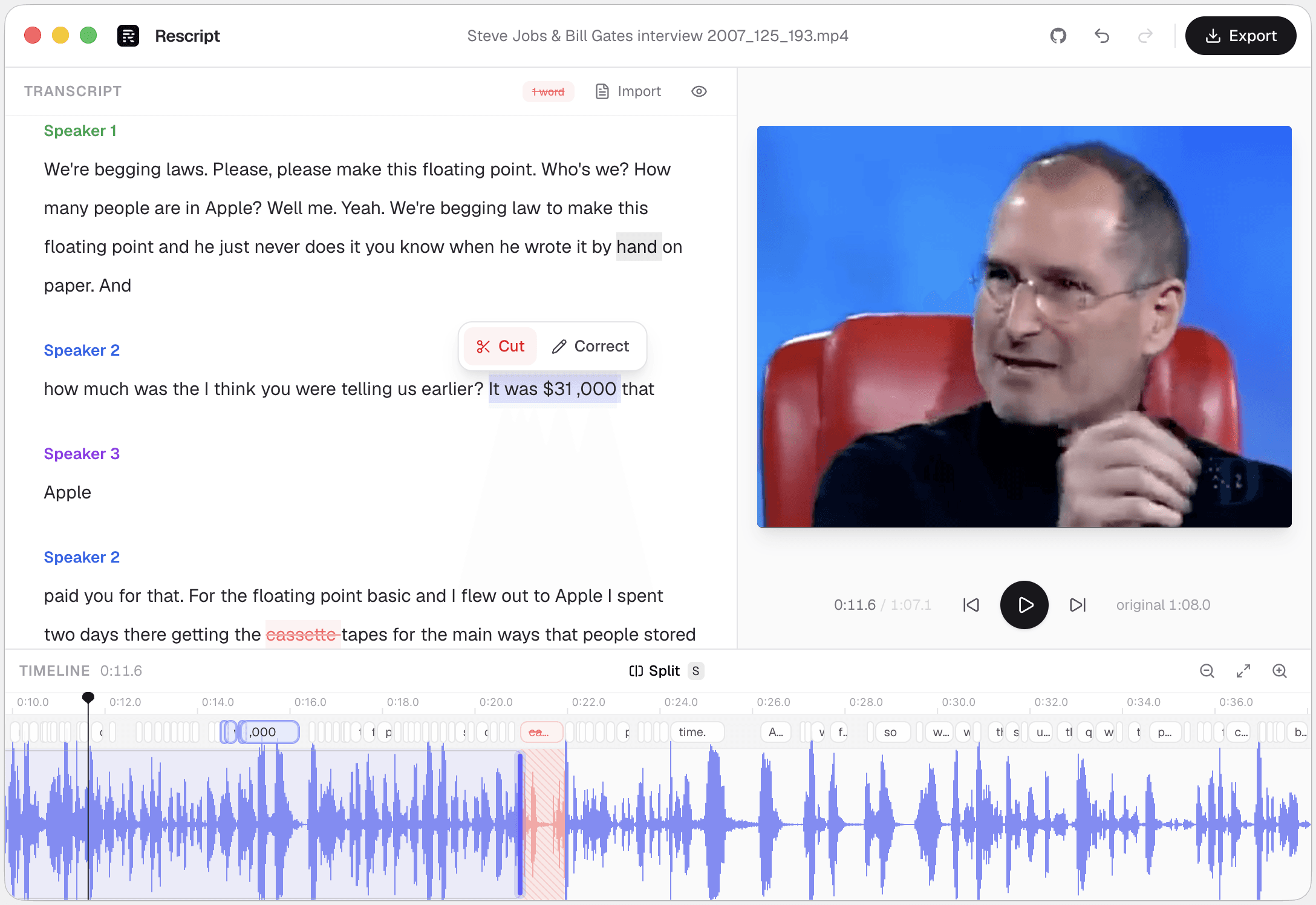
Side by side
Rescript compared with VEED.
| Feature | Rescript | VEED |
|---|---|---|
| Price | Free and open source for noncommercial use | Subscription; free tier is limited |
| Watermark | Never | On the free tier |
| Where your media goes | Nowhere. It never leaves your device | Video uploads to VEED to be edited |
| Account required | None — open it and start editing | Required |
| Usage limits | No minute caps, no export quota | Export length, quality, and AI credits by plan |
| Works offline | Yes, once the model has downloaded a first time | Needs a connection throughout |
| Source code | Public on GitHub — auditable | Proprietary |
| Delete words to cut footage | Word-level, with a live preview of the cut | Yes, text-based editing |
| Filler word removal | One click across the whole file | Yes |
| Silence removal | One click, pauses of 0.3s and over | Yes |
| Rewrite a line and have it spoken | Yes — cloned from that speaker's own audio, on-device | AI voices and dubbing, not a clone of the speaker in the file |
| Multitrack, layers, effects | No — one clip, transcript-first | Layers, text, images, transitions, templates |
| Burned-in captions | Exports SRT/VTT to burn in elsewhere; no styled overlay yet | Styled, animated, burned-in subtitles |
| Export formats | MP4, WebM, M4A, MP3, WAV, SRT, VTT, JSON | Resolution capped by plan |
 Rescript
Details about other products come from their own public pricing and documentation pages and change often — check theirs before you decide. Corrections are welcome as a GitHub issue.
"Browser-based" means two different things
VEED is a cloud application with a browser front-end: your file goes up, their servers do the work, you download the result. Rescript is a local application delivered through a browser — transcription on your GPU via WebGPU, export through ffmpeg compiled to WebAssembly on your CPU.
The practical difference is no upload wait, no export quota, no watermark, and no ability for anyone to see your footage. A long 4K render is bounded by your machine rather than your plan. If you'd rather not run it in a tab, the same editor ships as a desktop app for macOS, Windows, and Linux.
What Rescript won't do
It's not a general video editor. No layers, no text overlays, no transitions, no music, no templates, and no burned-in caption styling — it exports SRT and VTT for you to burn in elsewhere.
For a talking-head video, a podcast, an interview, or a course recording, that's usually the entire job. For a social edit with b-roll and kinetic captions, it isn't.
Which one
They're good at different jobs.
Choose VEED if…
- You need styled, animated, burned-in subtitles as the deliverable.
- You're assembling multiple clips, images, music, and text overlays.
- You want templates and brand kits for social output.
- You need translated subtitles or dubbing.
Choose Rescript if…
- You don't want a watermark, or to pay to remove one.
- The footage shouldn't be uploaded to a third party.
- Your file is long and you keep hitting export or upload limits.
- You mainly need to cut bad takes, fillers, and dead air out of a talking-head recording.
FAQ
Questions people actually ask
Is there a free video editor with no watermark?
Rescript exports without a watermark on every format and resolution, including 4K, at no cost for noncommercial use. There is no paid tier that removes anything, because nothing is added in the first place.
Can Rescript burn subtitles into the video?
Not yet. It exports SRT, VTT, and JSON caption files from the edited timeline, which you can burn in with ffmpeg or any editor. Burned-in captions are on the roadmap.
Does Rescript work on mobile?
The layout adapts to a phone, but transcription and export are heavy on memory and a desktop browser is strongly recommended. Chromium-based browsers work best, since Rescript needs SharedArrayBuffer.
Keep comparing

Rescript vs Descript
The original transcript-based editor — and a full cloud studio.

Rescript vs Riverside
Remote recording studio with a text-based editor attached.

Rescript vs Kapwing
Collaborative online editor with text-based trimming.

Rescript vs Premiere Pro
Adobe's NLE, with Text-Based Editing built in.

Rescript vs CapCut
ByteDance's free general-purpose editor.

Rescript vs Podcastle
Cloud podcast studio with AI voices and Magic Dust.

Rescript vs Recut
One-time-purchase desktop app for cutting silences.

Rescript vs TimeBolt
Automatic cutting of silence and filler words.

Rescript vs Cleanvoice
AI post-processing service for podcast audio.
Try it before you renew VEED.
Free, open source, and running on your own machine in under a minute. No account, and nothing to cancel later.
Or open the web app