


Rescript vs Descript
Rescript vs Descript
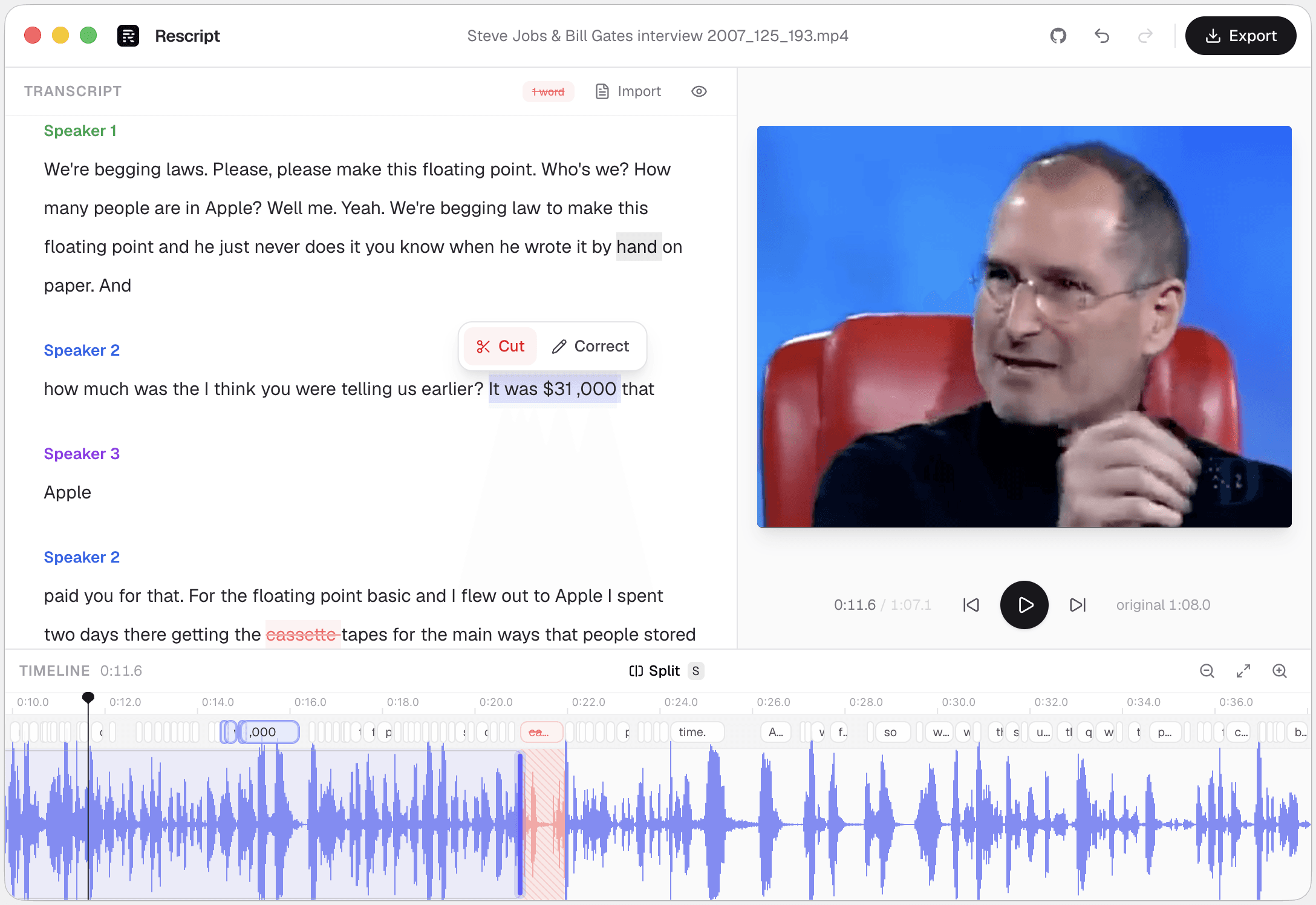
Rescript is a free, open-source, offline alternative to the part of Descript most people use: cutting video and audio by editing a transcript. It transcribes locally, cuts as you delete words, strips fillers and silences, and can respeak a rewritten line in the original speaker's cloned voice — with no account and nothing uploaded. Descript is the larger product: it also records, collaborates, repairs audio, and edits multitrack. If you need a production suite, stay with Descript. If you need transcript-based cutting without a subscription, this covers it.
Side by side
Rescript compared with Descript.
| Feature | Rescript | Descript |
|---|---|---|
| Price | Free and open source for noncommercial use | Subscription; the free tier is capped |
| Where your media goes | Nowhere. It never leaves your device | Uploaded to Descript's cloud to be processed |
| Account required | None — open it and start editing | Required, even on the free tier |
| Watermark | Never | Removed on paid plans |
| Usage limits | No minute caps, no export quota | Transcription hours metered by plan |
| Works offline | Yes, once the model has downloaded a first time | Cloud-dependent for transcription and rendering |
| Source code | Public on GitHub — auditable | Proprietary |
| Delete words to cut footage | Word-level, with a live preview of the cut | Yes — this is the feature it invented |
| Filler word removal | One click across the whole file | Yes, plus "shorten word gaps" |
| Silence removal | One click, pauses of 0.3s and over | Yes |
| Speaker detection | Local diarization, speakers renameable | Yes |
| Rewrite a line and have it spoken | Yes — cloned from that speaker's own audio, on-device | Overdub — paid, and the voice is trained and stored in their cloud |
| Noise removal / audio repair | No — nothing like Studio Sound | Studio Sound, background noise removal |
| Records video or audio | No — bring a file you already have | Screen and camera recording built in |
| Multitrack, layers, effects | No — one clip, transcript-first | Multitrack, layers, transitions, titles |
| Team collaboration | No — projects are local to your machine | Real-time collaboration, comments, sharing |
| Burned-in captions | Exports SRT/VTT to burn in elsewhere; no styled overlay yet | Styled, animated, burned-in captions |
 Rescript
Details about other products come from their own public pricing and documentation pages and change often — check theirs before you decide. Corrections are welcome as a GitHub issue.
Same workflow, different trust model
Both put a transcript where the timeline usually goes: select a sentence, press delete, and the footage goes with it. Rescript has the same one-click cleanups — strip every "um" in the file, cut every pause over 0.3 seconds.
What differs is where your media goes. Descript uploads it, which is exactly what makes its collaboration and cross-device features possible. Rescript uploads nothing: Whisper runs in your browser through WebGPU, diarization runs locally, and the render is ffmpeg on your own CPU. After the models download once, you can pull the network cable.
Overdub vs Regenerate
Descript's Overdub fixes a flubbed line in a voice trained on your recordings. It's paid, and the voice model is trained and stored on their servers.
Rescript's Regenerate does the same job on-device, cloning from about ten seconds of that speaker's own clean audio already in the project. No training session, nothing uploaded, and it works for any speaker in a multi-person recording — not just you. The new line is fitted to the exact span it replaces, so nothing downstream shifts.
Which one
They're good at different jobs.
Choose Descript if…
- You record inside the tool — screen, camera, or remote guests.
- You need multitrack production: layers, transitions, titles, effects.
- A team edits the same project and comments on it.
- Studio Sound is rescuing room audio you can't re-record.
Choose Rescript if…
- You want the transcript workflow without a subscription.
- The footage is confidential and can't be uploaded — interviews, legal recordings, unreleased work.
- You edit long files and keep hitting a transcription-hours cap.
- You'd rather read the code than trust a policy page.
FAQ
Questions people actually ask
Is Rescript really a free Descript alternative, or is there a catch?
It's free for noncommercial use under the PolyForm Noncommercial 1.0.0 license, with no feature gates, no trial, no transcription cap, and no watermark. Everything that runs on your own device stays free. Commercial use requires a paid license.
Can Rescript import a project from Descript?
Not a Descript project file, but you can export captions from Descript as SRT or VTT and import them into Rescript alongside the original media. Rescript will edit against your transcript instead of running Whisper.
Does Rescript have anything like Studio Sound?
No. There's no noise removal, de-reverb, or audio enhancement. Rescript cuts and re-encodes what's already in the file. If your source audio needs repair, do that first in another tool.
Is Rescript's transcription as accurate as Descript's?
It uses Whisper Base or Whisper Small, which handle clear speech well but won't match a tuned cloud pipeline on difficult audio. Both the words and their timings are editable, so you can correct anything it gets wrong and the cuts follow your correction.
Keep comparing

Rescript vs Riverside
Remote recording studio with a text-based editor attached.

Rescript vs VEED
Browser video editor with subtitles and AI tools.

Rescript vs Kapwing
Collaborative online editor with text-based trimming.

Rescript vs Premiere Pro
Adobe's NLE, with Text-Based Editing built in.

Rescript vs CapCut
ByteDance's free general-purpose editor.

Rescript vs Podcastle
Cloud podcast studio with AI voices and Magic Dust.

Rescript vs Recut
One-time-purchase desktop app for cutting silences.

Rescript vs TimeBolt
Automatic cutting of silence and filler words.

Rescript vs Cleanvoice
AI post-processing service for podcast audio.
Try it before you renew Descript.
Free, open source, and running on your own machine in under a minute. No account, and nothing to cancel later.
Or open the web app